
FAQs
The File Procedure and Its Compatibility
How can Slideonic build a presentation?
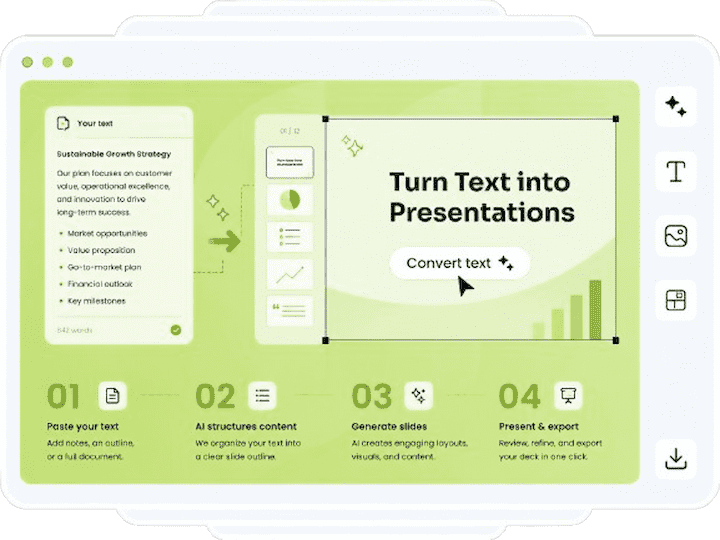
The generating process follows a straightforward three-step approach that allows you full control over the final product:
You can enter the summary of your topic, key points, or even a pre-existing paper here.
- Create and Revise: An structured outline will be constructed by the AI using your input. Prior to creating the final presentations, these components can be examined, reorganized, and improved.
- Graphics: Pick up a professionally designed template that appeals to your target audience, and the AI will carefully put your content into it.
What file formats are available for use in creating slideshows?
Uploading a pre-existing document, report, or project brief saves you the trouble of starting from scratch. We wholeheartedly support:
- A docx file is a Word document.
- Adobe Portable Document Format (PDF) File Extensions
- Plain Text (.txt)
Am I able to change the file types that I save? So, which ones are it?
Every presentation you make has two different download formats:
- You can make whatever changes you like to this PowerPoint (.ppt or.pptx) file. Since text blocks, structures, and layout containers are still considered native elements, you may still manually alter them.
- The Portable Document Format (.pdf) is perfect for static distribution, printing, or expedited sharing.
Will the files I download work with Google Slides and Apple Keynote?
Uploading the file to Google Drive allows you to access it in Google Slides, or you can import it into Apple Keynote on macOS or iOS without any issues. All of this is possible because Slideonic is compatible with the most popular PowerPoint files.
Confidentiality, Data Management, and Safety
If I upload my data, will it be secure?
Securing our infrastructure is our first priority. While stored or transmitted to our servers, all files, prompts, and presentation data are encrypted using a robust security protocol.
Will AI models be trained using my papers and texts?
Protecting your personal information is our top priority. Nothing you provide, including but not limited to research papers, company reports, and final presentation decks, will ever be made public. Neither will they be shared with anyone else or used to train AI models.
Where do my source files go if I send them in?
The system may be fed data from text files, PDFs, or Word documents in order to generate an outline. Upon completion of processing, our automated system will remove the original source files. You get to retain all of the presentations that are created.
Are there any limitations to the Trial Plan that you could inform me about?
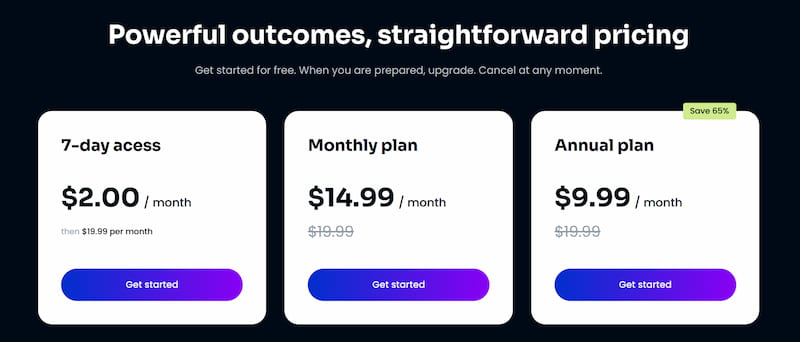
With our Trial tier, you may try out our platform without any risk. Each day, you are confined to making a single presentation. With our template collection, you can quickly and easily access designs that are industry standard and pre-made.
Registering and starting to produce immediately does not require the submission of any financial information.
What exactly are the benefits of the Premium Plans?
Typical use-related problems are removed when you choose a paid membership plan:
| Feature | Our Plans |
| Daily Generations | Unlimited |
| Processing Speed |
Priority Processing (Faster generation)
|
| Template Library |
Full Premium Access
|
| Hidden Fees |
None (Cancel or upgrade anytime)
|
What is the process to change or cancel my membership?
You have complete control over your billing. You may easily modify, upgrade, or downgrade your existing membership plan at any time from the account settings page or by contacting our support agents.